
CTP Machine Installation and Acceptance Checklist
Last updated: October 2026
Quick answer: Prepare the site before the machine ships: stable earthed power, a clean climate-controlled room, compressed air for pneumatic punches and benders, water and drain for the processor, network, space and an unloading route. After installation, sign off only when the machine passes acceptance tests: an image test, a plate check with a test form, a processor chemistry check and punch registration on press.
Key takeaways
- Installation succeeds or fails on site preparation done weeks before delivery.
- Every requirement value comes from the machine specification sheet and manual; this checklist tells you what to check, not the numbers.
- Our plate punches and benders are pneumatic, so plan clean, dry compressed air.
- A machine is installed only when it passes acceptance tests on plates, processing and press registration.
Use this page as a printable checklist for installing a platesetter, flexo imager, plate processor, baking oven, punch or bender. Platesetters and flexo imagers we offer are supplied with our partner factories; processors, baking ovens, punches and benders are made in our own factory. Each machine ships with its specification sheet and manual, which give the actual power, space and climate values. Tick each line, write the value from the sheet next to it, and share the completed list with your supplier before shipping. For choosing the machine itself, see the CTP machine selection guide.
Before you start: what this checklist covers
The list follows five stages: site preparation, delivery, installation day, acceptance tests and handover. Whether installation is done on site by an engineer or guided remotely is confirmed in the quotation, so confirm it early and plan who on your team will assist.
Site preparation checklist
| Item | What to check | Done |
|---|---|---|
| Floor space | Machine footprint plus service access on all sides as per the specification sheet; floor level and load-bearing | ☐ |
| Access route | Door width and height, corridors, lift, forklift or crane for unloading the crate | ☐ |
| Power supply | Voltage, phase, frequency and capacity match the sheet; dedicated circuit and breaker | ☐ |
| Earthing | Proper protective earth tested by an electrician | ☐ |
| Power stability | Voltage stabiliser or UPS where the grid is unstable | ☐ |
| Temperature and humidity | Air conditioning able to hold the range in the manual day and night | ☐ |
| Dust control | Room separated from press and paper dust; doors closed; clean floor | ☐ |
| Lighting | Safelight for UV/CTcP plates; normal light is fine for thermal plates | ☐ |
| Compressed air | Clean, dry, oil-free air with filter and regulator for pneumatic punches and benders | ☐ |
| Water and drain | Water supply and drain for the plate processor; waste developer collection | ☐ |
| Ventilation | Extraction for processors, baking ovens and flexo washout as required | ☐ |
| Network | Network point for RIP and workflow server; remote support access if agreed | ☐ |
| Consumables on site | Plates, developer, gum and test plates ready before the engineer arrives | ☐ |
“Our electrician says the power is fine” is the most common reason for random faults later. Ask the electrician to measure against the specification sheet and to test earthing, and keep the record.
Delivery and unpacking checklist
- Inspect crates for damage and tilt or shock indicators before signing the delivery note; photograph anything unusual.
- Move crates indoors and let them acclimatise before opening, as the manual advises.
- Check the packing list: machine, accessories, cables, spare parts kit, manuals, software media.
- Keep transport locks in place until the engineer or manual says to remove them.
- Store plates flat and sealed in the plate room; see our plate storage guide.
For crating and freight terms, see shipping and packaging.
Installation day checklist
- Position and level the machine with service access as on the site plan.
- Connect power and earthing; verify before switching on.
- Connect compressed air to punches and benders; set pressure at the regulator per the manual.
- Install the RIP or workflow computer and network connection.
- Fill the processor with fresh developer and set it for the plate grade per the TDS.
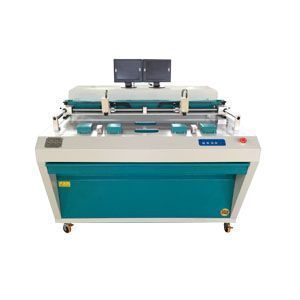
- Set the punch for each press model; punch dies can be custom-made for your press model, and benders are set per press model.
- Record all settings and save backups of RIP presets and curves.
Acceptance test checklist
A machine that powers on is not yet installed. Run these tests and sign off only when each one passes:
| Test | How | Pass condition | Done |
|---|---|---|---|
| Image test | Image a test form with tints, fine lines and text across the full plate width | Even image, no banding, correct size and position | ☐ |
| Plate check with test form | Process and measure the control strip with a plate densitometer | Tint values within the target agreed for the grade | ☐ |
| Processor chemistry check | Check developer temperature, speed and conductivity or replenishment settings | Matches the grade TDS; clean background | ☐ |
| Punch registration | Punch plates for each press and mount them | Plates register on press without manual correction | ☐ |
| Bending check | Bend plates for each press model | Plates fit the plate cylinder clamps | ☐ |
| Press test | Print a test job with your inks and paper | Print matches proof; plate cleans up normally | ☐ |
| Baking check (if used) | Bake a bakeable plate per the TDS | Even bake, no image damage | ☐ |
Use our plate test protocol for the press test, and link pass conditions to the warranty and service terms in your contract.
Handover and training
- Operators trained on daily use, loading, error messages and safe shutdown.
- Maintenance routines handed over; see our CTP machine maintenance guide and plate processor maintenance checklist.
- Manuals, specification sheets, passwords and software licences stored safely.
- Spare parts kit checked and contact route for technical support agreed.
- Signed acceptance report with test plates kept as reference.
Common mistakes
- Thinking “we can prepare the room after the machine arrives”; the engineer then waits and the visit is wasted.
- Measuring the door after shipping, then finding the machine arrived but did not fit through the door.
- Connecting pneumatic punches to wet or oily air.
- Skipping punch registration tests, so plates do not register on press after installation.
- Treating acceptance tests as a delay to production; they protect your warranty position.
FAQ
How do I prepare my site for CTP machine installation?
Check space and access, power and earthing, climate control, dust control, compressed air, water and drain for the processor, ventilation and network against the machine specification sheet before shipping.
What power supply does a CTP machine need?
It depends on the configuration. The voltage, phase, frequency and capacity are on the machine specification sheet; provide a dedicated, earthed circuit and a stabiliser or UPS where power is unstable.
Do plate punches and benders need compressed air?
Yes. Our plate punches and benders are pneumatic and need clean, dry compressed air with a filter and regulator.
What acceptance tests should be done after CTP installation?
Run an image test, a plate check with a test form, a processor chemistry check, punch registration and bending checks, and a press test with your inks and paper.
How long does CTP machine installation take?
It depends on the machine, the number of units and how well the site is prepared. The installation plan is confirmed in the quotation; a ready site is the biggest factor.
Planning a new plate room? Request a quote — send your room layout, power supply, press list and the machines you need (platesetter, plate processor, plate punch, bender, baking oven). Or contact us.
Disclaimer: values on this page are typical and for reference only; final specifications, MOQ, price and lead time are subject to the grade TDS and the quotation.

