
Plate Processor Maintenance Checklist
Last updated: October 2026
Quick answer: Maintain a plate processor with a fixed routine: check developer level, temperature and replenishment daily and clean the rollers, gum section and dryer at shutdown; clean brushes and filters weekly; change developer, clean the tank and inspect wear parts on a schedule set by the grade TDS and your plate volume. Most background and tint problems start here, not in the plate.
Key takeaways
- Developer condition, replenishment and roller cleanliness decide plate quality as much as the plate itself.
- Clean the gum section and rollers every day; dried gum causes scratches and marks.
- Change developer on a schedule, not only when plates fail; topping up alone does not reset exhausted developer.
- Temperature, speed and replenishment settings come from the plate grade TDS and the processor manual.
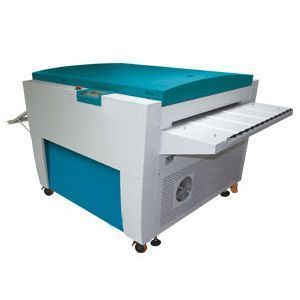
This printable checklist is written for the plate processors we manufacture in our own factory, and it applies to most offset plate processors with a developer section, wash, gum section and dryer. Keep it next to the machine and tick off tasks per shift. Settings such as developer temperature, processing speed and replenishment rate are not given here because they depend on the plate grade; take them from the grade TDS and the processor manual. Processless plates do not need chemical development, so this routine applies to thermal, CTcP and PS plates processed with developer.
Why plate processor maintenance matters
When plates come out with scum in the background, the first reaction is often “the plates are the problem, not the processor”. Sometimes that is true. More often, many background, tint and scratch problems come from developer condition, replenishment and dirty rollers in the processor. A clean, well-set processor gives stable plates from morning to night and makes real plate problems easy to identify. See our CTP plate processors for the machines this checklist is written for.
Daily maintenance checklist
| When | Task | Done |
|---|---|---|
| Start-up | Check developer level and top up with replenisher if low | ☐ |
| Start-up | Wait until developer temperature reaches the TDS setting before processing | ☐ |
| Start-up | Check wash water and gum levels | ☐ |
| Start-up | Process a control plate or strip; measure tints and check the background | ☐ |
| During shift | Watch the replenishment counter or log; note any change in plate quality | ☐ |
| Shutdown | Clean the gum section rollers with warm water so gum does not dry on them | ☐ |
| Shutdown | Wipe entry and exit rollers and the dryer section | ☐ |
| Shutdown | Leave covers as the manual advises to limit developer oxidation and evaporation | ☐ |
| Shutdown | Record plates processed and any issues in the logbook | ☐ |
Weekly maintenance checklist
| Task | Why | Done |
|---|---|---|
| Remove and clean the brush roller in the developer section | Coating residue on brushes causes uneven development and scratches | ☐ |
| Clean squeeze and transport rollers | Deposits cause marks and plate transport problems | ☐ |
| Clean or replace the developer filter | Sludge returning to the plate causes spots | ☐ |
| Flush the gum section and check spray pipes | Blocked nozzles give uneven gumming | ☐ |
| Clean the wash section and check water flow | Carry-over contaminates the gum | ☐ |
| Check developer temperature with a separate thermometer | Confirms the sensor reading | ☐ |
| Check replenishment pump output | Wrong replenishment drifts plate quality | ☐ |
Monthly and developer change checklist
Developer life depends on plate area processed, plate type, temperature and air contact. Change it on the interval the grade TDS and processor manual recommend, and sooner if plate quality drifts.
- Drain the developer into a waste container and handle it under local regulations.
- Clean the developer tank, removing sludge and deposits with the cleaner the manual allows.
- Rinse the tank thoroughly so no cleaner residue remains.
- Inspect brushes, rollers, gears, belts and seals for wear; replace worn parts.
- Replace the developer filter.
- Refill with fresh CTP developer matched to your plate grade.
- Reset the replenishment counter and record the date.
- Process a test form and measure tints before production.
Developer replenishment basics
Developer weakens in two ways: by processing plates (area replenishment) and by contact with air over time (time or oxidation replenishment). Most processors replenish for both. Setting basics:
- Use the replenishment rates in the grade TDS as the starting point.
- Adjust for your actual plate area and image coverage, based on control strip results.
- Where the processor supports it, conductivity-based control keeps activity steadier than fixed rates.
- “We top up developer instead of changing it” keeps the level right but lets contaminants build up; schedule full changes too.
When the developer turns dirty too fast, check replenishment, filter condition and whether plates from different grades share one bath.
Troubleshooting processor-related plate defects
| Symptom | Likely processor cause | Action |
|---|---|---|
| Scumming or tint in the background | Weak or exhausted developer, low temperature, speed too fast | Check temperature and replenishment; change developer |
| Tints too sharp, highlight dots lost | Developer too active or too hot, speed too slow | Reset to TDS values; check replenishment |
| Scratches | Dried gum or debris on rollers, worn brush | Clean rollers; replace brush |
| Spots or marks | Sludge, blocked filter, dirty wash water | Clean tank; replace filter |
| Uneven gum or sticky plates | Blocked gum nozzles, dryer issue | Flush gum section; check dryer |
| Plate jams | Dirty or worn transport rollers | Clean or replace rollers |
For plate-side causes, see our CTP plate troubleshooting guide; for the platesetter side, the CTP machine maintenance guide.
Common mistakes
- Skipping roller cleaning because “cleaning the processor takes too much time”; dried gum on the rollers scratches plates.
- Processing before the developer reaches temperature.
- Mixing developers or running grades that need different developers in one bath.
- Changing exposure on the platesetter to correct a developer problem.
- Using household cleaners or abrasives on rollers and brushes.
- Not logging developer changes, so drift cannot be traced.
Planning new equipment? See our full range of plate processing equipment, including plate baking ovens for bakeable plates.
FAQ
How do you clean a CTP plate processor?
Clean the gum section and rollers at every shutdown, the brush roller, filter and wash section weekly, and drain and clean the developer tank at each developer change, using only cleaners the manual allows.
How often should developer be changed in a plate processor?
Follow the interval in the grade TDS and processor manual, adjusted for your plate area. Change it sooner if control strips show drift or background scum.
Why does my plate processor leave scum on plates?
Common causes are weak or exhausted developer, low developer temperature, processing speed too fast or wrong replenishment. Check these before blaming the plate.
How do I set developer replenishment?
Start with the area and time replenishment rates in the grade TDS, then fine-tune using control strip measurements and your actual plate volume.
How do I shut down a plate processor at the end of the day?
Clean the gum rollers with warm water, wipe entry, exit and dryer rollers, set covers as the manual advises, and record plates processed in the logbook.
Need a processor, developer or support? Request a quote — send your plate grade, plate sizes, daily plate volume and current processor type and width. Or request trial plates / contact us.
Disclaimer: values on this page are typical and for reference only; final specifications, MOQ, price and lead time are subject to the grade TDS and the quotation.

