
Last updated: November 2026
Quick answer: Pinholing is tiny unprinted dots in flexo solids where the ink film does not close. The main causes are poor wetting (substrate treatment too low, ink surface tension too high), too little ink (low anilox volume or plugged cells), rough or dusty substrate, and a plate surface that does not lay ink evenly. Check treatment and anilox first; surface screening on a digital plate often helps.
Key takeaways
- Pinholes are a wetting and ink-film problem first; more impression rarely fixes them.
- On film, check the corona treatment level with dyne pens before changing ink or plate.
- Plugged or low-volume anilox cells give a thin film that cannot close over the substrate.
- Surface screening (microcells) on digital plates can improve solid ink density and reduce pinholes.
A solid that should look full and even comes off the press with tiny white specks, like a fine sieve. Solid ink density is low, the customer complains that the colour looks weak, and the operator adds impression until halos and dot gain appear elsewhere. Pinholing has several causes, and each one has a different fix. This guide shows how to identify true pinholes, trace the cause and choose the fix that lasts. For other flexo faults, start with our flexo printing problems overview.
What is pinholing in flexo printing?
Pinholing is a pattern of very small voids in printed solids and heavy tints. Each void is a spot where the ink film did not wet the substrate or did not flow together after transfer. It is most visible on films and foils in flexible packaging and labels, and on white or kraft liners in corrugated work, especially with light colours on a dark substrate or white ink on clear film.
Pinholes, fisheyes or foam: tell them apart
| Defect | What it looks like | Usual cause |
|---|---|---|
| Pinholes | Many tiny, evenly spread voids across the solid | Poor wetting, thin ink film, rough substrate, plate surface |
| Fisheyes | Fewer, larger round voids, often with a raised rim | Contamination: silicone, oil, slip additive on the surface |
| Foam marks | Round voids or rings that vary in size, changing over time | Air bubbles in the ink from pumping or agitation |
| Substrate voids | Voids that follow paper texture or fibres | Rough or porous surface, low impression on uneven board |
Look at the defect with a magnifier and check the ink in the chamber or fountain. Visible foam means foam marks, not pinholes. Large round voids with rims suggest contamination.
What causes flexo pinholing?
- Low substrate surface energy. Film surfaces need corona treatment so the ink can wet them. See corona treatment for film printing. Treatment decays with time and slip additives can migrate to the surface. If the substrate’s dyne level is too close to the ink’s surface tension, the ink pulls back and leaves pinholes.
- Ink surface tension and drying. Ink that dries too fast on the plate or the anilox does not flow out. Ink viscosity outside its range changes transfer and flow. See the Zahn cup viscosity guide for how to measure it.
- Anilox volume too low or cells plugged. A thin ink film cannot close over the substrate. Partially plugged cells reduce volume without anyone noticing. See our anilox roller guide.
- Impression too light on rough substrates, so the plate does not touch the low spots. The fix is a correct kiss setting, not excess pressure.
- Mounting tape. A tape that is too soft for solids can reduce contact in large solid areas; firmer tape is usually preferred for solids.
- Plate surface. A very smooth solid surface can transfer ink unevenly; a worn, swollen or dirty plate surface also causes voids.
- Dust and debris on the substrate or plate.
Flexo pinholing troubleshooting table
| Symptom | Likely cause | Check / fix |
|---|---|---|
| Pinholes start with a new roll of film | Low or decayed corona treatment | Test with dyne pens; re-treat inline or ask the film supplier |
| Pinholes increase during the run | Ink drying on plate or anilox, viscosity drifting | Check viscosity and pH (water-based) regularly; adjust drying speed with the ink supplier |
| Weak, pinholed solids on all substrates | Anilox volume too low or cells plugged | Clean and measure the anilox; consider a higher volume roll for solids |
| Voids follow board texture | Rough substrate, impression too light | Set correct kiss impression; review tape and plate hardness |
| Large round voids with rims | Contamination (fisheyes) | Check for silicone, oil or slip; clean rollers and plate |
| Pinholes only in one plate, others fine | Plate surface worn, swollen or dirty | Clean the plate; check ink and solvent compatibility |
| Solids grainy even when wetting is good | Plate surface not laying ink evenly | Trial surface screening on a digital plate |
Plate-side fixes: surface screening and plate condition
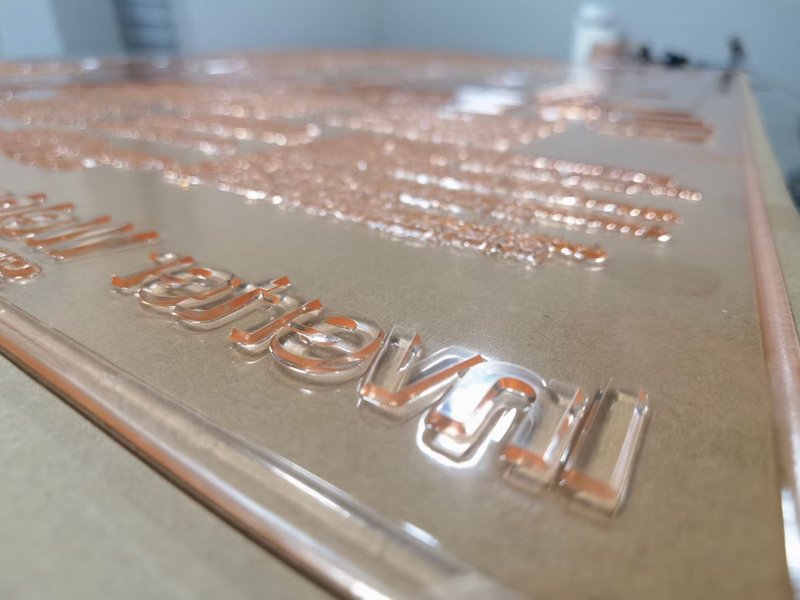
When ink, substrate and anilox are in order and solids still pinhole, look at the plate:
- Surface screening. A fine microcell pattern applied in the RIP to solid areas of a digital plate breaks the solid surface into tiny cells that carry and release ink more evenly. It is widely used in the industry to get denser, smoother solids with less pinholing. The best pattern depends on the ink, anilox and substrate, so confirm it in a press trial. Flat-top dot plates are usually used for this; see flat-top vs round-top flexo dots.
- Plate and ink compatibility. A plate that swells in the ink or wash solvent changes its surface and transfer. Our flexo ink and plate compatibility guide covers this. For UV inks, use a UV-resistant solvent-washout grade; our water-wash plates are not for UV inks.
- Plate condition. Dried ink in the solid surface, scratches and dust create voids. Clean plates promptly after the run and store them flat and covered, as described in flexo plate cleaning and storage.
We supply analog and digital flexo plates, including corrugated flexo plate grades. If you want to trial surface screening, tell us your ink system, substrate and anilox, and we will suggest a grade to test. Doctor blades, anilox rollers and mounting tape can be supplied together with plate orders, confirmed in the quotation.
How to prevent pinholing
- Check film treatment with dyne pens when each new roll goes on press. The dyne level test guide explains the method.
- Keep ink viscosity and, for water-based inks, pH in range throughout the run.
- Clean anilox rolls on a schedule and measure volume periodically.
- Use the anilox volume and tape hardness that suit solids, or split solids and fine tints onto separate plates.
- Set kiss impression, not heavy impression.
- Keep plates, substrate and press clean of dust, and store plates correctly.
FAQ
What causes pinholing in flexo printing?
Pinholing is caused by poor wetting (low substrate treatment or high ink surface tension), a thin ink film from low or plugged anilox cells, ink drying too fast, rough or dusty substrate, light impression on uneven board, and a plate surface that lays ink unevenly.
How do you fix pinholes in flexo solids?
Check substrate treatment and ink viscosity first, then clean and check the anilox. Set a correct kiss impression and use a tape suited to solids. If solids still pinhole, trial surface screening on a digital plate.
Does corona treatment affect pinholing?
Yes. Corona treatment raises the surface energy of film so ink can wet it. If treatment is too low or has decayed in storage, the ink pulls back and leaves pinholes. Check it with dyne pens before printing.
Can the flexo plate cause pinholing?
Yes, but it is rarely the first cause. A smooth solid surface can lay ink unevenly, and a worn, swollen or dirty plate also causes voids. Surface screening and correct plate cleaning address these.
What is surface screening on flexo plates?
Surface screening is a fine microcell texture added to solid areas of a digital flexo plate in the RIP. It helps the solid carry and release ink more evenly, which can raise solid ink density and reduce pinholing. The pattern should be confirmed by a press trial.
Want to trial a plate for denser solids? Request a quote and send your plate gauge, ink system, substrate, anilox and imager type. Or request trial plates / contact us.
Disclaimer: values on this page are typical and for reference only; final specifications, MOQ, price and lead time are subject to the grade TDS and the quotation.


